Aggregated resource
All-in-One
Use this page when you want the whole lesson in a single continuous view with a simple filter and a one-click way to open solutions.
Lesson controls
Jump between episodes, filter the page, or reveal every hint and solution when you need the full teaching flow.
Episode
Designing a Hugo-first lesson
Questions
- What should a modern lesson template preserve from the old Carpentries stack?
Objectives
- Identify the teaching features that matter more than the old implementation details.
- Recognise which pieces should live in a shared module versus in a lesson repository.
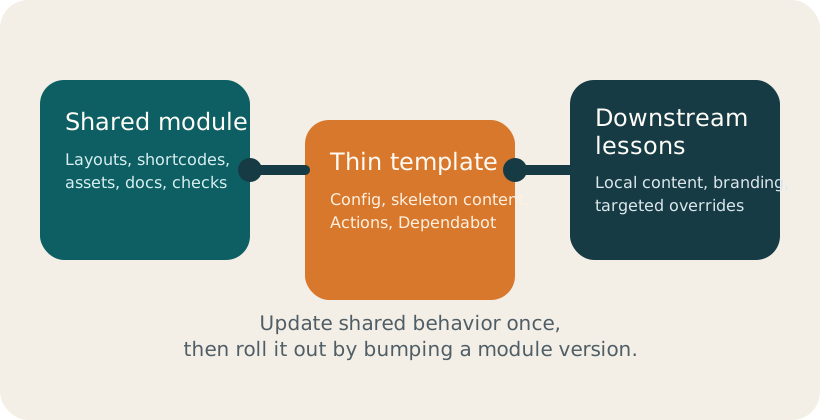
The lesson infrastructure in this repository is intentionally split in two:
- a shared module that owns the reusable lesson system
- a starter template that stays light and project-specific
That means people can keep their tutorials current without copying framework files across repositories.
If you are starting a real lesson, begin with
hugo-styles-template
and treat the pages in this section as examples of supported behavior.
The module keeps the teaching model front and centre. For example, we can link directly to Formative Assessment practices and connect activities to a target learner profile such as Workshop Host .
Key Points
- Preserve pedagogy and author ergonomics, not the historical implementation.
- A thin lesson repo plus a shared module gives a much cleaner update path.
Episode
Using challenge and solution blocks
Questions
- How should active-learning blocks behave in a Hugo-based lesson?
Objectives
- Use challenge, hint, and solution shortcodes in a way that feels natural to authors.
- Show how learner and instructor context can coexist in the same episode.
Shortcodes should help the author express teaching intent, not force them to think about page mechanics.
Draft a reusable exercise block
Write a short prompt that asks contributors to identify which parts of a lesson framework should remain shared across repositories.
Need a hint?
Show solution
- Does the activity ask learners to do something concrete?
- Is the expected answer small enough for a workshop?
- Could an instructor reveal the solution only when needed?
Why not keep legacy fenced-attribute syntax?
Callout gallery
The older styles lessons relied heavily on recognisable teaching boxes. In this stack, they are still first-class teaching components, but their presentation stays closer to Hextra’s overall visual system.
Expand the Show code toggles to see the shortcode syntax for each box without making the page much longer.
Show code (note)
{{< callout type="note" title="Note" >}}
Use this for side context or reminders that support the main narrative.
{{< /callout >}}Show code (prereq)
{{< callout type="prereq" title="Prerequisite" >}}
Use this when learners need knowledge or setup in place before continuing.
{{< /callout >}}- Confirm the prompt is concrete.
- Keep the exercise small enough for a workshop.
- Make the reveal optional.
Show code (checklist)
{{< callout type="checklist" title="Checklist" >}}
- Confirm the prompt is concrete.
- Keep the exercise small enough for a workshop.
- Make the reveal optional.
{{< /callout >}}Show code (discussion)
{{< callout type="discussion" title="Discussion" >}}
Ask learners to compare trade-offs before showing a canonical answer.
{{< /callout >}}Show code (testimonial)
{{< callout type="testimonial" title="Instructor perspective" >}}
“This kind of box is useful when I want to signal facilitation intent without breaking the flow of the lesson.”
{{< /callout >}}Show code (warning)
{{< callout type="warning" title="Common trap" >}}
Avoid using a generic callout when the content is actually an exercise or a solution. Those need their own behaviour.
{{< /callout >}}Show code (caution)
{{< callout type="caution" title="Migration caution" >}}
Legacy lessons may contain nested blockquote syntax that should be migrated automatically, but unusual customisations still deserve a quick manual pass.
{{< /callout >}}Key Points
- Challenge blocks should be easy to read in source form and easy to scan on the page.
- Hints and solutions should stay collapsible but also support bulk expansion in the all-in-one page.
Episode
Setup choices, profiles, and native embeds
Questions
- How do we document setup and learner variation without overloading the main narrative?
Objectives
- Show how profile pages and glossary pages support lesson navigation.
- Use Hugo-native embed syntax instead of hand-written iframe HTML when a provider shortcode exists.
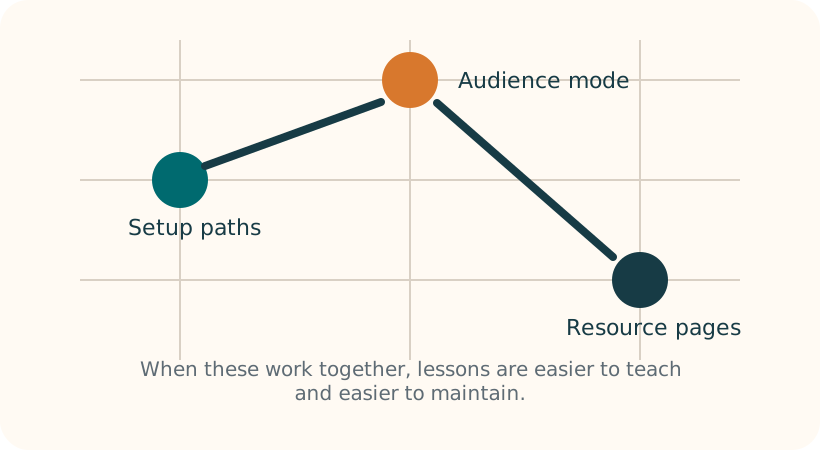
Profiles make it easier to explain why a lesson exists for different audiences. In this example, the Workshop Host profile cares most about pacing, while the Self Paced Maintainer profile cares more about update flow and repo ownership.
For terminology, content can link to short definitions like Audience Toggle without interrupting the main narrative.
Tabs for local setup choices
This page opts out of synced tabs so the examples can stay local to this episode. That is useful when one tab set is about operating systems and another is about shells, but you do not want changing one to affect the other.
export LESSON_ENV=workshopBecause this page disables sync, the second shell tab group below starts independently instead of following the choice above.
echo $LESSON_ENVBelow is a native Hugo video embed example:
Key Points
- Profiles and glossary entries are easier to maintain as real content pages.
- Supported video providers should use Hugo shortcodes rather than raw iframe HTML.
Episode
Physics notation, diagrams, and richer docs
Questions
- How can we communicate a particle-physics analysis workflow clearly without custom frontend code?
Objectives
- Use LaTeX and Mermaid to express analysis logic and notation directly in lesson content.
- Use Hextra components to keep setup, navigation, and optional depth structured and maintainable.
This episode demonstrates documentation-focused Hextra features in a particle-physics context. The goal is to keep source files readable for authors while giving learners clear visual structure.
LaTeX for physics notation
Inline notation is useful for compact expressions like , , and .
A standalone equation block can communicate selection logic and uncertainty estimates more clearly:
details blocks.Mermaid for analysis flow
    flowchart LR
  A[Detector data] --> B[Reconstruction]
  B --> C[Quality filters]
  C --> D[Object selection]
  D --> E[Signal region]
  D --> F[Control region]
  E --> G[Fit and inference]
  F --> G
    sequenceDiagram
  participant C as Collaborator
  participant CI as CI checks
  participant R as Reviewers
  C->>CI: Push selection update
  CI-->>C: Validation and build report
  C->>R: Open PR with plots and notes
  R-->>C: Request uncertainty clarification
Synced tabs for command variants
Use repeated tab labels to keep shell choices synced across blocks.
hugo servergo run github.com/oer-particle-physics/hugo-styles/cmd/hugo-styles-migrate@latest check .FileTree and Cards for orientation
- 01-introduction/index.md
- 04-physics-doc-features/index.md
- setup.md
- hugo.toml
Steps plus optional deep dive
Write the question and objective first
Anchor the episode around one concrete analysis skill.
Add one core equation and one core diagram
Use LaTeX and Mermaid to keep explanation compact and precise.
Keep setup variants in tabs
Avoid long repeated command blocks in linear prose.
Hide advanced context in details blocks
Keep the default reading path short, then let motivated learners expand.
Optional: invariant-mass reminder
Use this as context when explaining mass-window selection.
Document a toy signal-selection flow
Add one Mermaid flowchart and one LaTeX equation to a new episode page that explains a toy signal-vs-background workflow.
Need a hint?
Show solution
details block for background theory.Key Points
- Prefer built-in Hextra features over custom templates for diagrams and notation.
- Use tabs, details, steps, cards, and filetree to separate core path from optional depth.