Components
This is the live reference for features owned by hugo-styles. Each example is rendered here; open the adjacent Use it block to copy its source. Theme-level features live in the Hextra feature guide.
Challenge, hint, and solution
Choose a reproducible cut
Keep the first pass small.
Pick one event-selection threshold and explain what it removes.
Need a hint?
Show solution
Use it
{{< challenge title="Choose a reproducible cut" subtitle="Keep the first pass small." >}}
Pick one event-selection threshold and explain what it removes.

{{< hint >}}Start with a transverse-momentum threshold.{{< /hint >}}
{{< solution >}}Use `p_T > 25 GeV` and record it.{{< /solution >}}
{{< /challenge >}}
Callout palette
Use it
{{< callout type="note" title="Note" >}}Supporting context.{{< /callout >}}
{{< callout type="prereq" title="Prerequisite" >}}Required setup.{{< /callout >}}
{{< callout type="checklist" title="Checklist" >}}Checks to complete.{{< /callout >}}
{{< callout type="discussion" title="Discussion" >}}Compare approaches.{{< /callout >}}
{{< callout type="testimonial" title="Instructor perspective" >}}An experience.{{< /callout >}}
{{< callout type="warning" title="Warning" >}}A likely mistake.{{< /callout >}}
{{< callout type="caution" title="Caution" >}}An edge case.{{< /callout >}}
Inline callout titles
Callout titles accept inline Markdown such as code, emphasis, strong text, and links. The rendered result must remain structurally inline; otherwise, the original source is displayed literally. Goldmark settings and render hooks still apply, including smart punctuation and trusted inline HTML. If Goldmark disables raw HTML, its source is displayed literally instead of disappearing from the title.
jobs before continuingUse it
{{< callout type="note" title="Run `jobs` before continuing" >}}
Use the title to name commands and other short technical identifiers precisely.
{{< /callout >}}
Audience-aware content
Supporting pages can place the selector exactly where readers need it. Episode and All-in-One pages include it automatically.
Use it
{{< lesson/audience-toggle >}}

{{< learner >}}Learner-facing guidance.{{< /learner >}}
{{< instructor >}}Facilitation guidance.{{< /instructor >}}
Set the initial view in hugo.toml:
[params.lesson]
  defaultView = "learner" # or "instructor"
The precedence is a valid ?view= value, a saved choice, this configured default, then learner.
Glossary and profile links
Inline references resolve to normal content pages: Formative Assessment and Workshop Host .
Use it
{{< glossary formative-assessment >}}
{{< profile workshop-host >}}
Lesson image
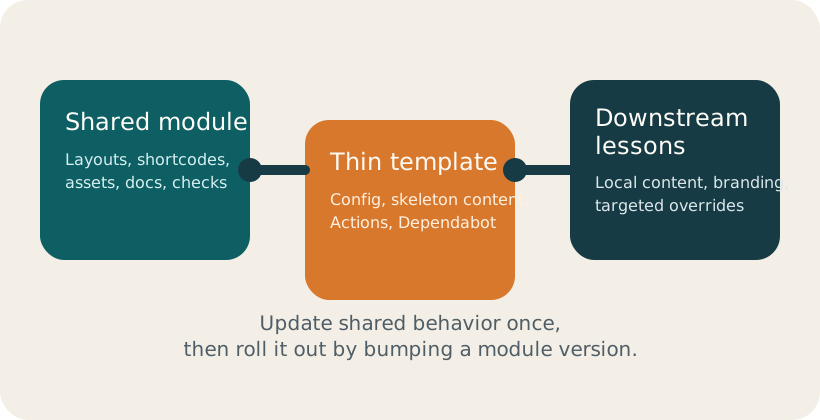
lesson/image accepts page-bundle resources and the shared static/{fig,files,data,code} paths. It requires src and meaningful alt text and follows the global or per-page image-zoom setting.
Use it
{{< lesson/image
  src="/fig/lesson-flow.svg"
  alt="Lesson content flowing into facilitation and reusable resources."
  width="560"
  class="hx:rounded-xl"
>}}
style remains available for legacy content, but prefer width and class. Disable zoom for one page with imageZoom = false in its front matter.
Live lesson metadata
The configured lesson title is Hugo Styles. This value comes directly from params.lesson, so content does not need to duplicate it.
Use it
{{< lesson/meta "title" >}}
{{< lesson/meta "tagline" >}}
{{< lesson/meta "description" >}}
{{< lesson/meta "siteTitle" >}}
Generated lesson resources
The homepage already renders the episode overview, schedule, and authors. The same episode metadata also drives:
Use it on a homepage
{{< lesson/overview >}}
{{< lesson/schedule title="Schedule" >}}
{{< lesson/authors title="Authors and Contributors" >}}