Hextra Feature Guide
This page is a live, offline-capable showcase of the Hextra features selected for lesson authors. Use the copy button on any code block, and use the Copy page menu beside the title to view this page as Markdown.
Math
Inline notation such as stays readable in a sentence. Display equations can carry the central result:
Use it
Inline: \(p_T > 25\,\mathrm{GeV}\)

$$
Z \approx \frac{N_{\mathrm{sig}}}{\sqrt{N_{\mathrm{bkg}} + (\delta N_{\mathrm{bkg}})^2}}
$$
Mermaid diagrams
    flowchart LR
  A[Toy events] --> B[pT selection]
  B --> C[Signal region]
  B --> D[Control region]
  C --> E[Count and report]
  D --> E
Use it
```mermaid
flowchart LR
  A[Toy events] --> B[pT selection]
  B --> C[Signal region]
  B --> D[Control region]
  C --> E[Count and report]
  D --> E
```
Synced tabs
Choose a shell here:
source .venv/bin/activateThe matching choice follows in this second group:
python analysis.pyUse it
{{< tabs >}}
{{< tab name="bash" selected=true >}}bash command{{< /tab >}}
{{< tab name="fish" >}}fish command{{< /tab >}}
{{< /tabs >}}
Enable sync globally, then opt out for a page only when its tab groups are unrelated:
# hugo.toml
[params.page.tabs]
  sync = true

# page front matter
[tabs]
  sync = false
Details and steps
Optional interpretation
Record the input
Name the sample and the expected columns.
Apply one explicit cut
Keep the first selection easy to reproduce.
Report counts with context
State the signal and control windows beside the result.
Use them
{{< details title="Optional interpretation" closed="true" >}}
Extra context.
{{< /details >}}

{{% steps %}}
### Record the input
### Apply one explicit cut
### Report counts with context
{{% /steps %}}
Cards, badges, and icons
Use them
{{< cards cols="2" >}}
{{< card link="/docs/components" title="Lesson components" icon="puzzle" >}}
{{< card link="/all-in-one" title="All-in-One" icon="book-open" >}}
{{< /cards >}}

{{< badge content="offline asset" color="green" icon="check" >}}
{{< icon name="beaker" >}}
File tree
- 01-introduction/index.md
- index.md
- particle-analysis.ipynb
- particle-analysis-handout.pdf
Use it
{{< filetree/container >}}
  {{< filetree/folder name="content" >}}
    {{< filetree/file name="hugo.toml" >}}
  {{< /filetree/folder >}}
{{< /filetree/container >}}
Syntax highlighting and code copy
| |
The copy button in the upper-right corner is enabled automatically.
Use it
```python {filename="selection.py",linenos=table,hl_lines=[2,4]}
selected = [event for event in events if event.pt > 25]
```
Image zoom
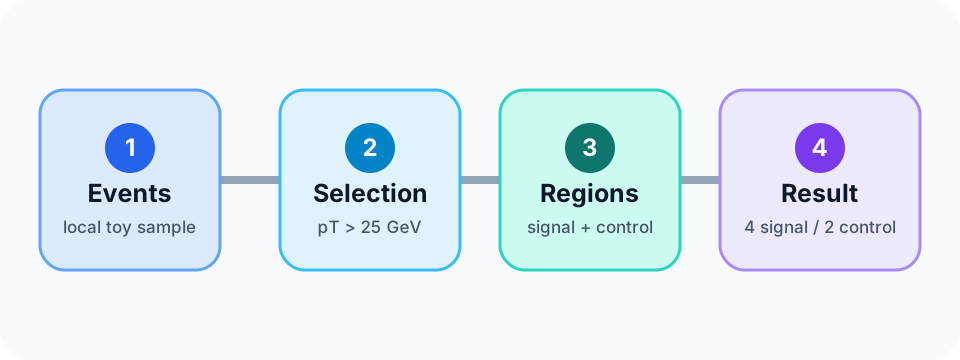
Click this page-bundle image to enlarge it:
Use it
Enable the local vendored zoom script globally, with an optional page opt-out:
# hugo.toml
[params.imageZoom]
  enable = true
  js = "js/vendor/medium-zoom.min.js"

# page front matter
imageZoom = false
Local PDF
Open or download the handout if the embedded viewer is not convenient.
Use it
[Open or download the handout](particle-analysis-handout.pdf).

{{< pdf "particle-analysis-handout.pdf" >}}
Local Jupyter notebook
The code cell and its saved deterministic output render without a notebook server or network request.
events = [
    {"pt": 30, "mass": 91}, {"pt": 45, "mass": 88},
    {"pt": 27, "mass": 95}, {"pt": 60, "mass": 82},
    {"pt": 35, "mass": 70}, {"pt": 50, "mass": 75},
    {"pt": 22, "mass": 90}, {"pt": 20, "mass": 70},
    {"pt": 30, "mass": 105}, {"pt": 40, "mass": 55},
    {"pt": 24, "mass": 85}, {"pt": 28, "mass": 120},
]
selected = [event for event in events if event["pt"] > 25]
signal = sum(80 <= event["mass"] < 100 for event in selected)
control = sum(60 <= event["mass"] < 80 for event in selected)
print(f"selected={len(selected)} signal={signal} control={control}")Use it
{{% jupyter "particle-analysis.ipynb" %}}Keep the .ipynb file in the same page bundle as index.md.
Banner, search, and theme
The dismissible banner at the top identifies this documentation as a live demo. Search is visible in the navigation, and the theme menu offers Light, Dark, and System.
Configure them
[params.banner]
  key = "hugo-styles-feature-demo-v1"
  message = "This documentation is a live feature demo. See the [feature guide](/docs/hextra-features/)."

[params.search]
  enable = true
  type = "flexsearch"

[params.theme]
  default = "system"
  displayToggle = true
Use a root-relative path for an internal banner link so Hugo applies the site’s base path and keeps navigation in the same tab. Changing the banner key makes a revised announcement visible even to readers who dismissed an older one.
Markdown context menu
Use Copy page beside this title, or open its menu to view the exact Markdown source.
Configure it
[outputs]
  page = ["HTML", "Markdown"]
  section = ["HTML", "Markdown"]

[params.page.contextMenu]
  enable = true
Opt out for one page with contextMenu = false in front matter.
Version selector
The deployed demo builds Latest and the archived v0.4.0 site. Use Versions in the navigation to move between them.
Configure it
[params.versioning]
  enable = true
  defaultBranch = "main"

  [params.versioning.latest]
    enable = true
    label = "Latest"

  [params.versioning.tags]
    refs = ["v0.4.0"]
The curated gallery intentionally leaves out comments/blog features, Hextra’s separate data-file term system, include-based content reuse, and CDN-backed terminal recordings. They overlap with this lesson model or weaken the offline build contract.