Episode
Dynamic File Discovery with Checkpoints
Questions
- When are ordinary wildcards no longer enough?
- What does a
checkpointdo in Snakemake? - How does Snakemake expand the DAG after files are discovered at run time?
Objectives
- Recognise when a workflow needs a
checkpoint. - Write a checkpoint that discovers input files and records them in simple file lists.
- Use
checkpoints.<name>.get()inside an input function. - Interpret the DAG before and after checkpoint expansion.
In the previous episode, we listed the datasets and chunk identifiers in advance. That works well when the workflow already knows what files it should process.
Sometimes, however, the file list is only known after an earlier step has run.
For example, you might first scan a directory, query a bookkeeping service such as
DAS (in CMS) or Rucio, or more generally,
produce one text file per dataset listing the discovered inputs. In those cases,
the downstream jobs cannot be fully determined at the start of the workflow.
This is where Snakemake checkpoints become useful. The official Snakemake
documentation describes this under
data-dependent conditional execution.
When You Need a Checkpoint
If you already know the files you want to process, use ordinary wildcards and
expand(). That is simpler and easier to read.
Use a checkpoint only when an earlier rule must first discover the files that
later rules will process.
A Checkpoint for File Discovery
We begin with a checkpoint that writes one file list per dataset:
DATASETS = ["DYJets", "TTbar", "Data"]


checkpoint get_dataset_files:
    output:
        expand("file_lists/{dataset}.txt", dataset=DATASETS)
    params:
        datasets=" ".join(DATASETS)
    shell:
        """
        mkdir -p file_lists

        for dataset in {params.datasets}; do
            find "input/$dataset" -maxdepth 1 -type f -name "*.txt" | sort > "file_lists/$dataset.txt"
            test -s "file_lists/$dataset.txt"
        done
        """
Each text file under file_lists/ contains the discovered input files for one
dataset. In a real analysis, the same pattern could come from a DAS/Rucio
query, an EOS directory scan, or some metadata service.
At this stage, it is useful to run only the checkpoint outputs and inspect what they contain:
pixi run snakemake --cores 1 \
    file_lists/DYJets.txt \
    file_lists/TTbar.txt \
    file_lists/Data.txt
Now inspect one of the file lists to see what the checkpoint produces:
cat file_lists/DYJets.txtTurning File Lists into Downstream Targets
After the checkpoint has run, we can also inspect its outputs programmatically and build the list of files that should be created by the selection step:
from pathlib import Path


def selected_files(_wildcards):
    file_lists = checkpoints.get_dataset_files.get().output
    outputs = []

    for file_list in map(Path, file_lists):
        dataset = file_list.stem

        with open(file_list, "r", encoding="utf-8") as handle:
            for line in handle:
                source_path = line.strip()

                if not source_path:
                    continue

                source = Path(source_path)
                outputs.append(str(Path("selected") / dataset / source.name))

    return outputs
The crucial line is:
checkpoints.get_dataset_files.get()This tells Snakemake:
- run the checkpoint if needed
- wait until its outputs exist
- then reevaluate the input function using those outputs
In this lesson, we read the file lists directly because it makes the reason for
the checkpoint easy to see. Another common pattern is to use
glob_wildcards() after the checkpoint has materialised its outputs.
The Full Workflow
Putting the pieces together gives:
from pathlib import Path


DATASETS = ["DYJets", "TTbar", "Data"]


def selected_files(_wildcards):
    file_lists = checkpoints.get_dataset_files.get().output
    outputs = []

    for file_list in map(Path, file_lists):
        dataset = file_list.stem

        with open(file_list, "r", encoding="utf-8") as handle:
            for line in handle:
                source_path = line.strip()

                if not source_path:
                    continue

                source = Path(source_path)
                outputs.append(str(Path("selected") / dataset / source.name))

    return outputs


rule all:
    input:
        "plots/event_counts.txt"


checkpoint get_dataset_files:
    output:
        expand("file_lists/{dataset}.txt", dataset=DATASETS)
    params:
        datasets=" ".join(DATASETS)
    shell:
        """
        mkdir -p file_lists

        for dataset in {params.datasets}; do
            find "input/$dataset" -maxdepth 1 -type f -name "*.txt" | sort > "file_lists/$dataset.txt"
            test -s "file_lists/$dataset.txt"
        done
        """


rule select_events:
    input:
        "input/{dataset}/{sample}.txt"
    output:
        "selected/{dataset}/{sample}.txt"
    shell:
        """
        mkdir -p "selected/{wildcards.dataset}"
        grep "Selected" "{input}" > "{output}" || test $? -eq 1
        """


rule make_plot:
    input:
        selected_files
    output:
        "plots/event_counts.txt"
    script:
        "plot.py"
Notice what has disappeared compared with the previous episode: we no longer
need a manually written CHUNKS = [...] list. The workflow discovers the files
and uses them to define the downstream jobs.
We also reuse the same plot.py script from the previous episode. The gather
logic does not need to change; only the way Snakemake discovers its inputs is
new.
What the DAG Looks Like
Before the checkpoint has run, Snakemake cannot yet know which select_events
jobs will exist. The workflow therefore starts with a much smaller DAG:
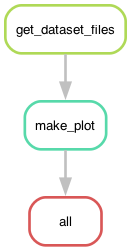
After the checkpoint has produced the file lists, Snakemake reevaluates the workflow and expands the full workflow structure:
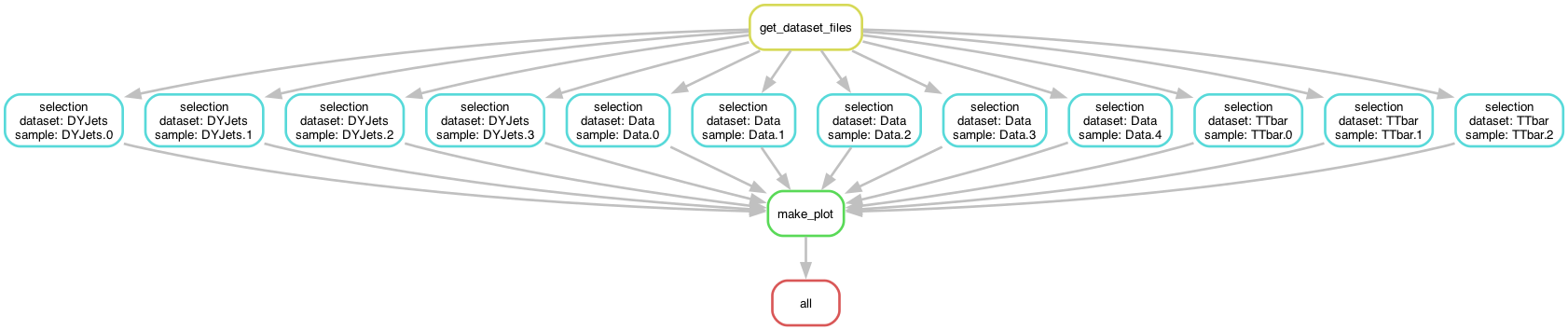
This is the core idea of a checkpoint: the DAG is not fully known at the start, so Snakemake has to discover part of it during execution.
Running the Workflow
Start with a dry-run:
pixi run snakemake -n -pThen run the workflow:
pixi run snakemake --cores 4The execution has two phases:
- Snakemake runs
get_dataset_files. - It updates the checkpoint dependencies.
- It schedules the individual
select_eventsjobs. - It runs
make_plotonce all selected files are ready.
That is why checkpoint workflows can feel different from ordinary static DAGs: Snakemake discovers part of the workflow as it goes.
Do You Really Need a Checkpoint?
Imagine that you already know the dataset names and chunk identifiers before the workflow starts.
Should you still use a checkpoint?
Show solution
Usually not. If the file list is already known in advance, ordinary wildcards
and expand() are simpler and easier to maintain.
A checkpoint is most useful when the downstream file list depends on something that must first be discovered at run time.
Key Points
- Use a
checkpointwhen the downstream file list is only known after an earlier step has run. - A
checkpointlets Snakemake pause, run a discovery step, and then reevaluate the DAG. - Input functions can inspect
checkpointoutputs and construct the downstream targets dynamically. - If the file list is already known in advance, ordinary wildcards and
expand()are simpler.